 DotMD
Claude Code made a plan.Read it, comment on it, then approve.
Plan mode makes Claude Code write a plan before it touches your code. Here is where that plan lives and how to read it, mark what should change and check the result in DotMD.
macOS 14 or later. Reading is free; editing and reviews are one payment.
Quick answer
In plan mode (Shift+Tab, or start a prompt with /plan), Claude Code writes its plan to a Markdown file in ~/.claude/plans. Set "plansDirectory": "./plans" in .claude/settings.json to keep plans in the project instead. Open that folder in DotMD to read each plan rendered, comment on the lines you want changed, and let Claude Code fix them before you approve.
What Claude Code plan mode does
In plan mode, Claude Code reads and explores your project, then writes a plan. It does not edit your source files until you approve the plan. That makes the plan the cheapest place to catch a wrong idea: a mistake in step 3 costs one comment, not a rewritten feature.
There are three ways in:
- Press Shift+Tab in the prompt to switch modes.
- Start a prompt with
/plan. - Start a session with
claude --permission-mode plan.
To start every session in plan mode, set defaultMode to "plan" in your settings.
Where Claude Code saves the plan files
By default, plans are Markdown files in ~/.claude/plans, outside your project. That is easy to lose track of, and a plan there is not in git. The plansDirectory setting moves them. Put it in .claude/settings.json:
{
  "plansDirectory": "./plans"
}
The path is relative to the project root. A path outside the project, such as ../plans, is ignored, and plans go back to ~/.claude/plans. Inside the project you can commit them, review them in a pull request and let the next session reread them.
Read the plans in DotMD
A plan is Markdown with headings, lists, tables and often a diagram. DotMD shows it the way it is meant to read, not as raw text in a terminal.
-
Add the folder
Press ⌘O and choose the project folder, or the plans folder inside it. For the default location, choose
~/.claude/plansitself: in the Open dialog, ⇧⌘. shows hidden folders. -
Watch it appear
New plans show up in the sidebar while Claude writes them, and the open file reloads when it changes. Tables, code and Mermaid diagrams are drawn.
-
Read it start to finish
Read the whole plan before you comment. Wrong order of steps, a missing migration, a file Claude should not touch: you will see more on the second pass.
Comment, don't retype
Typing "no, change step 3 to use the existing helper" in the chat means Claude has to guess which step you mean. In DotMD you select the step and press ⌥⌘M, then write what should change. Comments stay tied to their lines and never touch the file.
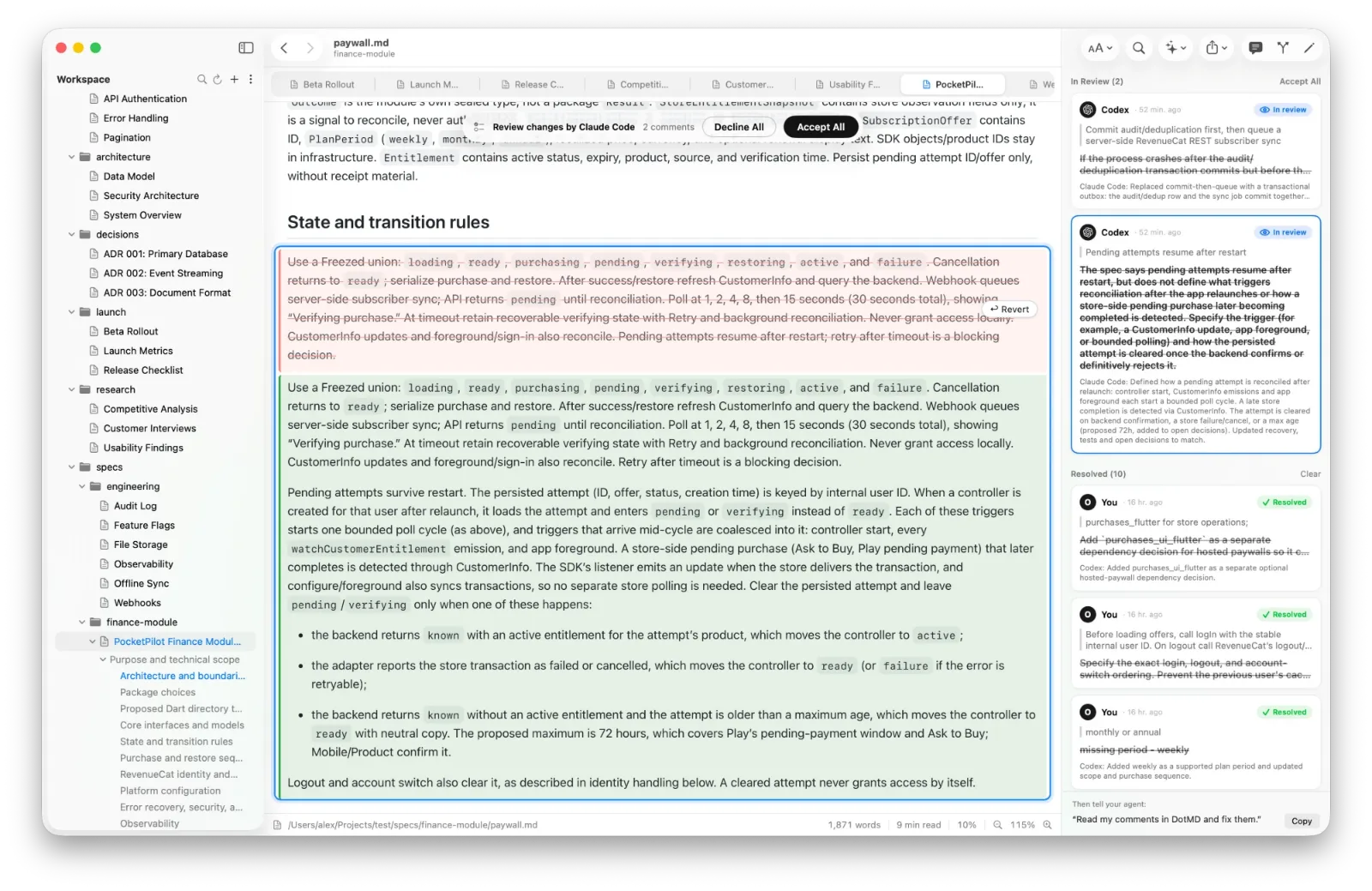
When you have been through the plan, tell Claude Code: "Go through my comments in DotMD." It reads them over MCP, fixes the plan and sends each comment back with a note. You see every fix in the file, the old text in red and the new in green, and accept or reopen each one. Then approve, and Claude starts building. Connecting takes one line: see the Claude Code guide.
Make Claude send every plan to you
You can ask for it each time, or say it once. Add a line like this to your CLAUDE.md:
After writing a plan, send it to me with request_review in DotMD
and wait for my approval before changing any code.
Claude then hands the plan to DotMD and waits in one call, using no tokens, until you click Send with your comments or Approve. DotMD can also add its review rules to your instruction file in one click: see CLAUDE.md and AGENTS.md on a Mac.
Ctrl+G or DotMD?
Claude Code can open the plan in your text editor with Ctrl+G, so you change it yourself. That is the quick way to fix one word. DotMD is for the other job: marking what Claude should change across a long plan, and checking afterwards what it changed, including edits nobody asked for. They work together; use whichever fits the fix.
Questions about Claude Code plans
Where does Claude Code save plans?
In ~/.claude/plans, unless plansDirectory in your settings points inside the project.
Can I keep plans in git?
Yes. Set plansDirectory to a folder inside the project, such as ./plans or docs/plans, and commit it.
Does DotMD need to be open while Claude plans?
Only for comments and reviews over MCP. Reading plans needs just the app.
Is reading plans free?
Yes. Comments and reviews with agents need DotMD Reviewer; see pricing.