 DotMD
DotMD
Claude Code writes the plan.You review it in DotMD.
Connect Claude Code to DotMD once. Every spec and plan it writes then comes to you as a document to read and comment on, not a wall of text in the terminal, and every fix shows up in the file for you to accept.
macOS 14 or later. Reading is free; DotMD Pro has a 3-day free trial.
Quick answer
Turn on DotMD's MCP server (Settings → MCP), then run claude mcp add --transport http dotmd http://127.0.0.1:8089/mcp once. Ask Claude Code to send its spec to you in DotMD. It waits while you comment, fixes each comment in the file and waits again until you approve. Reviews and the agent tools are part of DotMD Pro (3-day free trial); reading stays free.
How to connect Claude Code to DotMD
DotMD runs a small MCP server on your Mac. Claude Code talks to it to open files in DotMD, send you documents for review and read your comments. Setting it up takes a minute.
-
Turn on DotMD's MCP server
In DotMD, open Settings → MCP and switch on MCP server. The status turns green. Switch on Start with DotMD too, so the server is ready whenever DotMD is open.
-
Add DotMD to Claude Code
Run this once in Terminal:
claude mcp add --transport http dotmd http://127.0.0.1:8089/mcpThis adds DotMD to the project you're in. To have it in every project, put
--scope userbeforedotmd. If you changed the port, copy the address from the top of Settings → MCP. -
Check that it answers
Ask Claude Code to open a Markdown file in DotMD. The file opens, and Recent Requests in Settings → MCP lists the call in plain words, with a green check.
View and comment on a Claude Code plan
Ask Claude Code for the document, and say where it should go and that you want to review it:
"Write the spec to docs/spec.md and send it to me in DotMD for review."
-
Claude Code sends you the file
It saves the spec and sends it to you for review. A notification appears, the file is listed under Needs You, and Claude Code waits. It spends no tokens while you read, however long you take.
-
You comment on the passages
Read the spec rendered, with its tables, diagrams and code. Select a passage that should change, press ⌥⌘M and write what you want. Go through the whole document before you send anything.
-
You send the comments
Click Send at the bottom of the Review panel. Claude Code gets all your comments at once. If you have nothing to change, the button says Approve.
-
You check each fix in the file
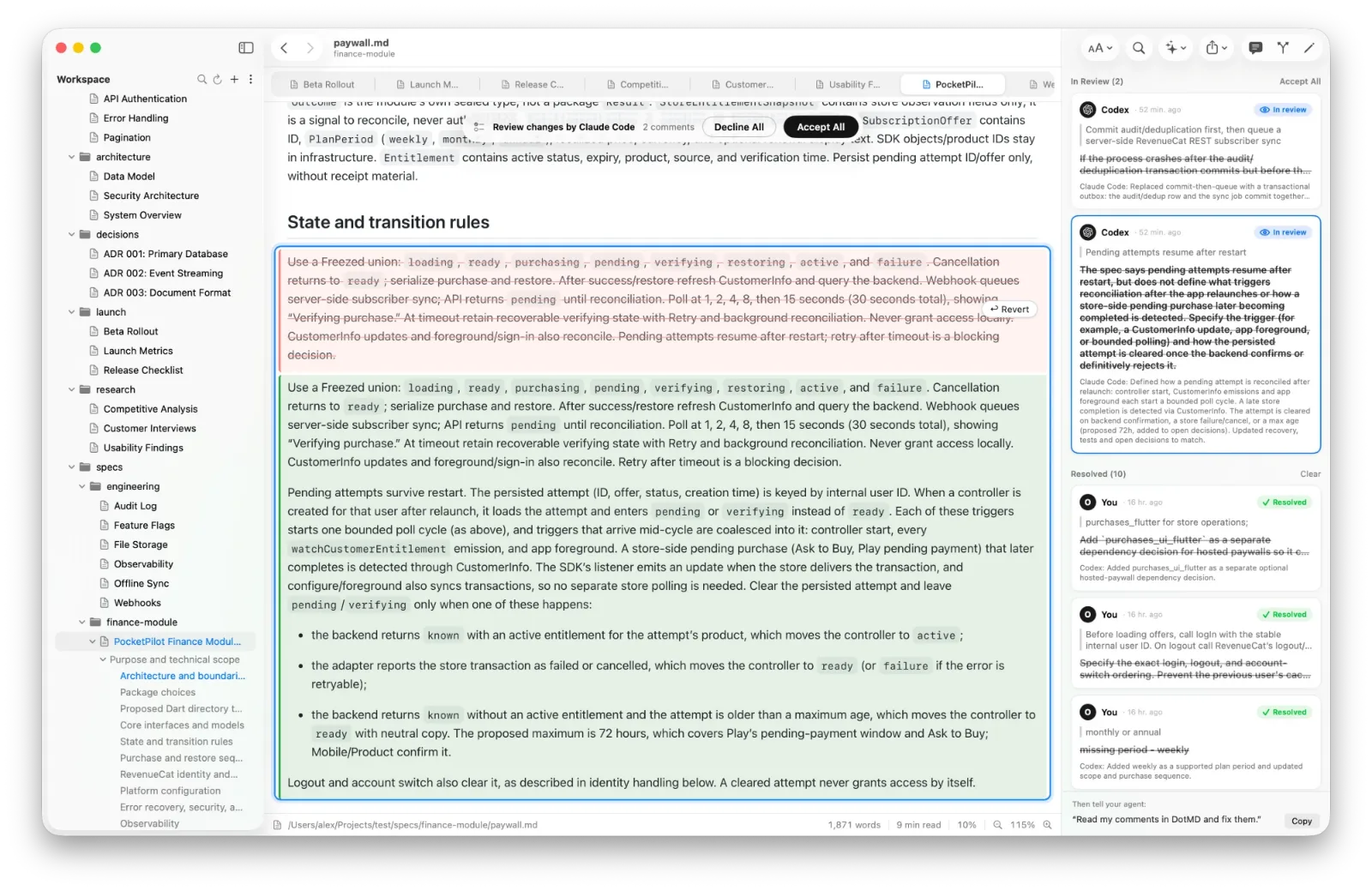
Claude Code edits the file and sends each comment back with a note on what it did. Every fix sits next to the comment it answers, the old text in red and the new in green. Accept it, Reopen it, or Accept All.
-
You approve
After its fixes Claude Code waits again. Leave more comments and click Send for another round, or click Approve, and it carries on, for example with the code.
Make it a habit: a few lines in CLAUDE.md
Claude Code sends a document for review when you ask it to. To have it do that every time, and to always look for your comments in DotMD, add these lines to CLAUDE.md in your project, or to ~/.claude/CLAUDE.md for all your projects:
Comments and reviews on Markdown files are kept in DotMD (MCP server `dotmd`), not in the files.
When I mention comments, a review or remarks on a .md file, read them with get_review_comments,
fix each one and send it back with resolve_review_comments.
After writing or substantially changing a spec, plan or design doc for me, send it to me with
request_review and wait for my answer; call it again after fixing my comments, until I approve.
The first line matters most. Your comments are kept by DotMD, not in the file, so an agent that doesn't think of DotMD searches the project for them and finds nothing.
Things to ask Claude Code
Once DotMD is connected, Claude Code can show you things in DotMD as well as send you documents. A few requests that work well:
- "Write the plan to docs/plan.md and open it in DotMD."
- "Show me in DotMD where you changed the pricing."
- "I left comments on the plan in DotMD. Go through them."
- "Rewrite the paragraph I selected in DotMD."
- "Review docs/compare.md in DotMD and leave your comments on the lines."
The last one turns Claude Code into the reviewer: its comments appear in DotMD under its name, and you choose which ones the writer gets. See One agent reviews another.
Claude Code in a Docker container
Inside a container, 127.0.0.1 is the container itself, not your Mac. Docker Desktop lets containers reach the Mac as host.docker.internal, so add DotMD with that address:
claude mcp add --transport http dotmd http://host.docker.internal:8089/mcpOther computers still can't reach DotMD: the server answers on this Mac only. The MCP server guide has the details.
Questions about Claude Code and DotMD
Does Claude Code spend tokens while it waits for my review?
No. It waits in one tool call until you click Send or Approve, however long you take.
Does DotMD have to be open?
Yes. DotMD runs the MCP server while it's open. Settings → MCP → Start with DotMD keeps it ready.
Does DotMD send my files anywhere?
No. The server answers only on your Mac, and your files, comments and history stay there. Claude Code itself works with Anthropic as it always does.
Can Claude Code review a document Codex wrote?
Yes. Claude Code leaves its comments on the lines, you keep the ones that matter, and Codex fixes them. See One agent reviews another.