 DotMD
DotMD
One agent writes, another reviews.You decide.
A second opinion on a spec, a plan or a table, from a different agent or model. The reviewer leaves comments on the lines, you keep the ones that matter, and the writer fixes them.
macOS 14 or later. Reading is free; DotMD Pro has a 3-day free trial.
Quick answer
Ask a second agent to review the file in DotMD; it leaves its remarks as comments on the lines, with its name. You delete, edit or keep them and add your own, then the writer fixes them. You check the fixes, not the whole draft. The agents never talk to each other directly. Reviews and the agent tools are part of DotMD Pro (3-day free trial); reading stays free.
The loop
Say Claude Code writes a spec and Codex reviews it. Six steps, and you are in the middle of each:
-
The writer writes
Claude Code, or any other agent, writes the document.
-
The reviewer comments
Codex reads the file and leaves its remarks as comments on the lines they are about.
-
You moderate
Read the remarks. Keep, edit or delete them, and add your own.
-
The writer fixes
It reads the comments that are left, fixes them and sends each one back with a note.
-
You check the fixes
Each fix sits next to its comment. Accept or reopen it, or Accept All.
-
Another round, if you want one
The reviewer looks at the result and leaves new comments where it is still wrong.
Everything goes through the document and its comments, so you see each step and nothing happens behind your back.
Ask the reviewer
In the reviewing agent, name the file and say where to leave the remarks:
"Review docs/compare.md in DotMD and leave comments on the rows you disagree with."
It puts each remark on its lines instead of answering in the chat: one comment per table row, paragraph or list item. The comments appear in the Review panel under Open with the reviewer's name, Codex, and are marked yellow on the page like yours. Each agent keeps its own colour, so you can tell them apart.
Tell the reviewer what to look for. It works better than a general request:
- "…check every number against the linked sources."
- "…look for steps that can't be rolled back."
- "…only leave comments that need a change, no praise."
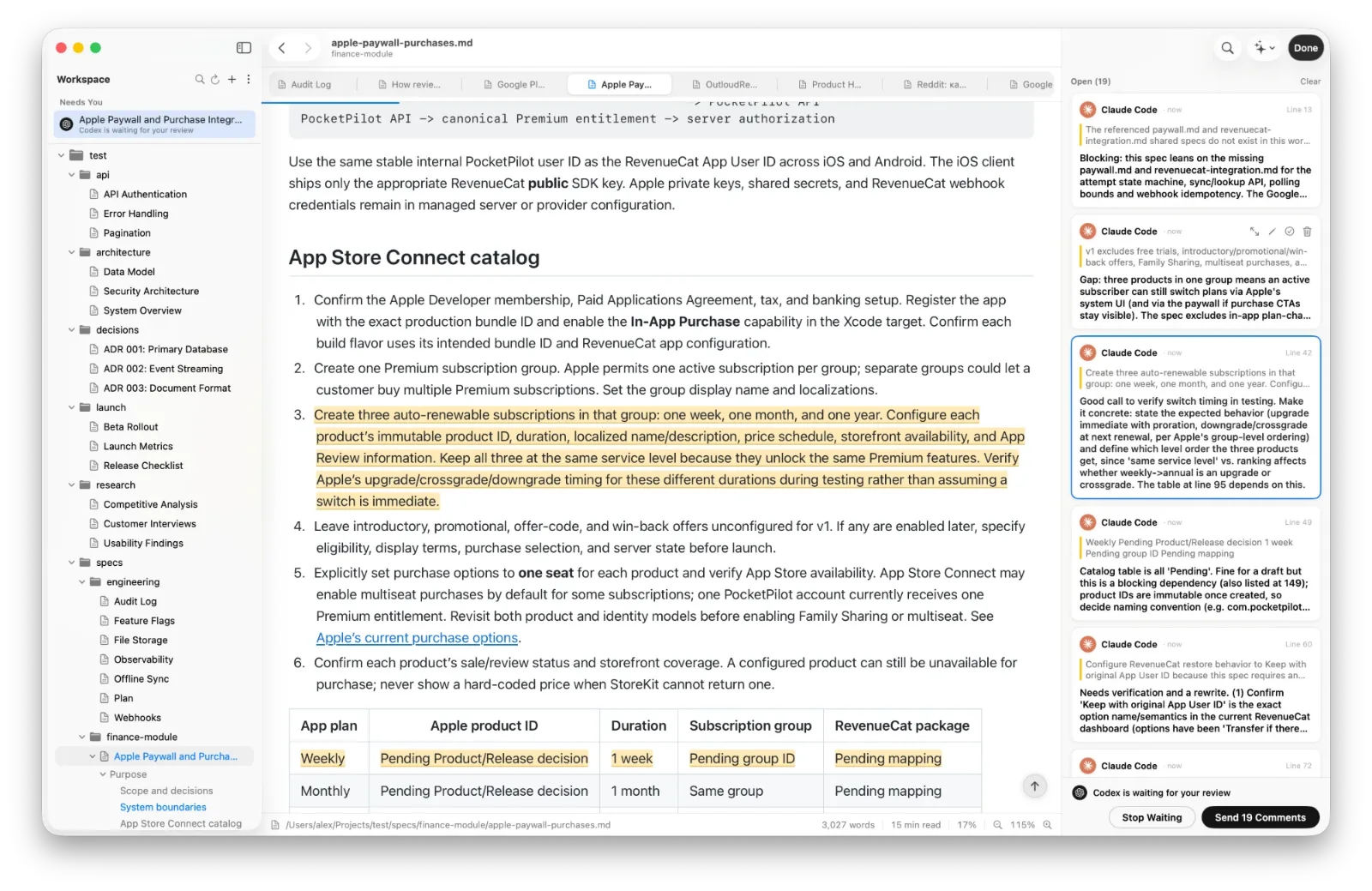
Moderate the comments
Before the writer sees anything, it is your call. You can:
- Delete remarks you disagree with.
- Edit the ones that are right but unclear.
- Resolve the ones that need no change; they won't go to the writer.
- Add your own comments next to the reviewer's.
The writer gets exactly what is left under Open. If it sent the document for review and waits, click Send. Otherwise tell it: "Read the comments in DotMD and fix them." It sees who left each comment, you or the reviewer.
Another round, if you want one
When the writer has sent its fixes, ask the reviewer to look at the result:
"In DotMD, check how your comments on docs/compare.md were addressed and leave new comments where it's still wrong."
The reviewer can read the resolved comments together with the writer's notes, so it knows what was answered and how. It leaves new comments where something is still wrong; you moderate them and hand them to the writer as before. Repeat until the fixes are right, then approve.
When it's worth it
- A design spec checked by a different model than the one that wrote it.
- A comparison table checked row by row against the vendors' docs.
- A migration plan checked for missed steps.
- A README checked for commands that don't work.
- Two reviewers on the same file: their comments land side by side, each with its own name.
You can also give the reviewer a narrow job, such as "Review the security section only" or "Check that every API in the plan exists in the code." For the setup of each agent, see the Claude Code and Codex guides.
Questions about agents reviewing agents
Do the two agents talk to each other?
No. Everything goes through the document and its comments, and you see each step.
Can the reviewer and the writer be the same agent?
Yes, but a different agent or model gives a second opinion.
Do I have to read every remark?
You decide which ones the writer gets: delete the rest before you press Send.
Which agents can review?
Any MCP client that can call add_review_comments: Claude Code, Codex, Cursor and others.