 DotMD
DotMD
Every change an agent makes,right in the file.
When an AI agent fixes your comments, DotMD shows the edits in the document itself, not as a diff in a terminal. Keep the ones you like, undo the ones you don't, and go back to any earlier version.
macOS 14 or later. Reading is free; DotMD Pro has a 3-day free trial.
Quick answer
When an agent fixes your comments, DotMD shows what changed since it read them: old text struck out in red, new text in green, next to the comment it answers. Accept a fix, Reopen it, or Accept All. Changes nobody asked for are counted separately. Every earlier version stays in Version History. Reviews and the agent tools are part of DotMD Pro (3-day free trial); reading stays free.
How to check an agent's fixes in a Markdown file
When an agent reads your comments, DotMD notes the file as it is at that moment. Everything that changes after that is shown in the document: the old text struck out in red, the new text in green. That is the review. You don't need git for it.
-
Open the review
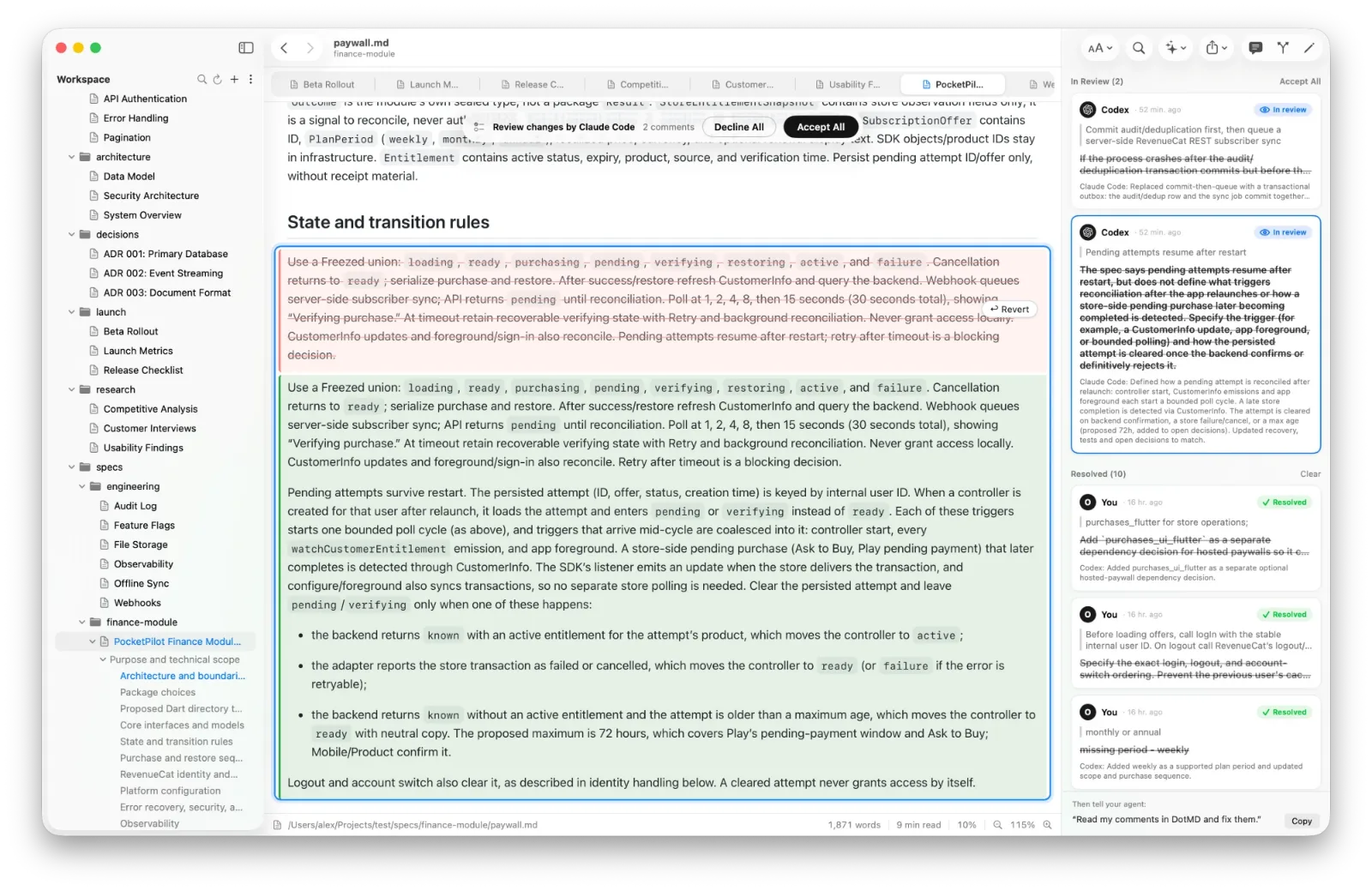
Click Review in the toolbar. A banner on top of the page says whose changes these are and how many, for example Review changes by Claude Code · 3 comments · 2 other changes.
-
Read each fix next to its comment
Click a comment in the panel and the page scrolls to its changes. The agent's note on what it did is on the card.
-
Accept it or reopen it
Accept keeps the change and moves the comment to Resolved. Reopen undoes the change and sends the comment back to Open, so the agent sees it again. Edit the comment first if you want to say why.
-
Finish
Accept All keeps every change and ends the review. Decline All puts the file back as it was when the agent read the comments. Done (⌘↩) closes the panel and waits: open Review again to continue, even after quitting DotMD.
Changes and comments point at each other
Click a change on the page and its comment is selected in the panel. A comment's changes include the place you pointed at and every other place the agent changed for it, such as a test plan or a summary table it updated to match. You see the whole fix, not just one line.
Other changes
The banner also counts other changes: edits no comment asked for. They are things the agent did on its own, or changes made to the file since the review started, yours included. Look at them too. This is where an agent's surprises hide. Revert on a change undoes just that change.
Version History: compare, revert, restore
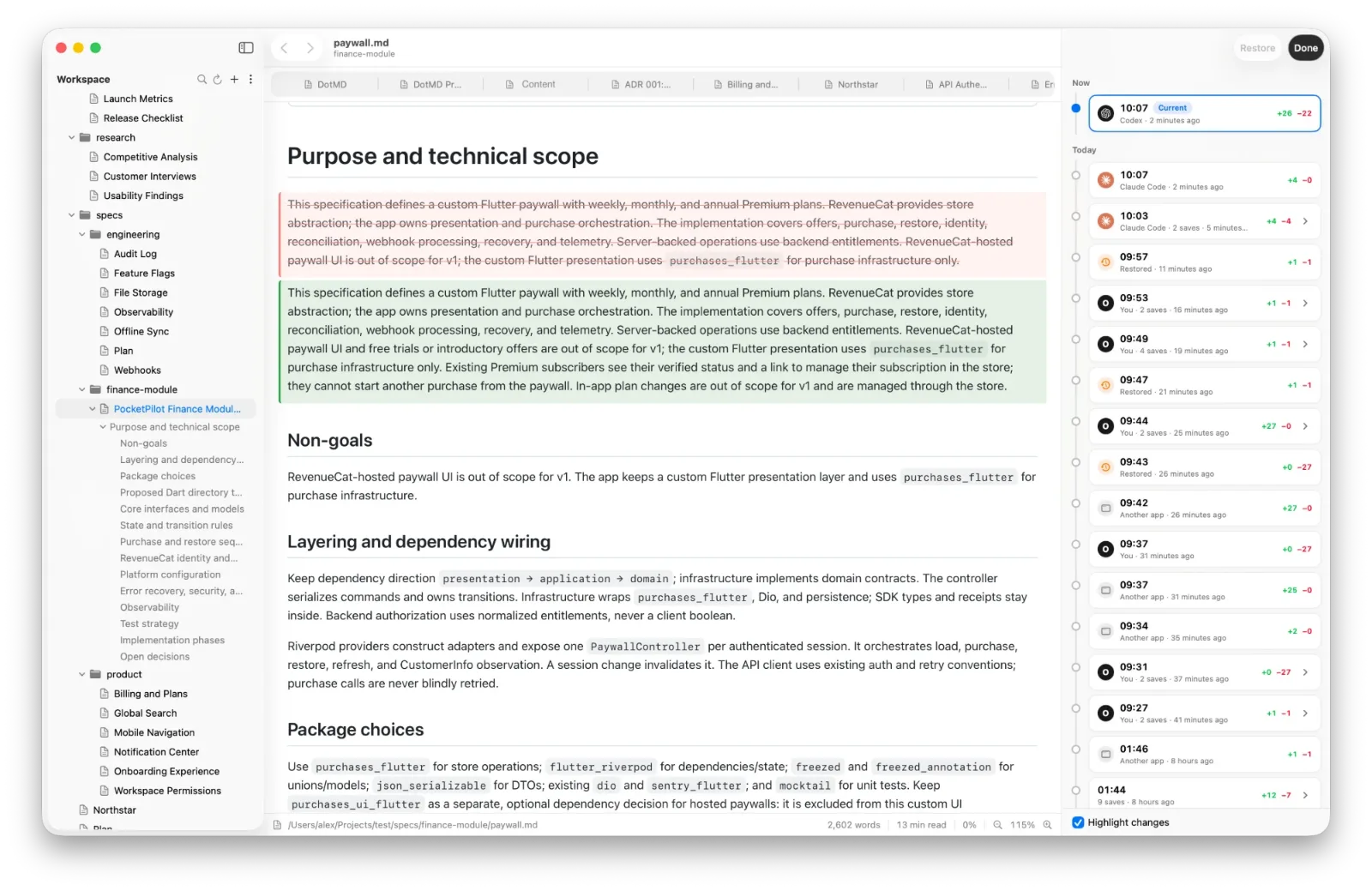
Press ⌥⌘Y, or choose File → Show Version History. The versions are listed by day on the right, and the page shows the selected one with what changed since the version before it: added text in green, removed text in red.
- Restore puts the selected version back. The current text is saved as a version first, so a restore can be undone by restoring again.
- Revert one change. On the current version, click Revert on the red text of a block, then Apply Reverts. The file is written with just those changes undone, and the rest stays.
- Every undo is kept. Before Reopen, Revert or Decline All change the file, its text is saved as a version, so an undone fix can be brought back.
When versions are saved and how long they're kept
DotMD saves a version whenever anyone changes the file: you, an AI agent, git or another app, whether or not the file is open. It also saves one when you open a file, finish editing, or quit, and every two minutes while you type. A file an agent creates keeps a single version until you first open it, so you never see a draft history you didn't read.
Older versions are thinned out the way Time Machine does it: everything from the last day, then one an hour for a week, one a day for a month, and one a week after that, up to 200 per file. A file that another app changed gets an orange dot in the sidebar. Open it and DotMD goes straight to what changed.
Questions about reviewing changes
Do I need git for this?
No. DotMD keeps a version whenever anyone changes the file: you, an agent, git or another app.
Can I undo just one change?
Yes. In Version History, mark a block with Revert and press Apply Reverts; the rest stays.
What are "other changes"?
Edits no comment asked for: ones the agent made on its own, or changes made since the review started, yours included.
How long are versions kept?
Everything from the last day, then one an hour for a week, one a day for a month, one a week after that, up to 200 per file.