 DotMD
DotMD
The agent writes the docs.You keep them right.
When an AI agent writes the documentation, someone has to check it. Read every page rendered, comment where it is wrong, see every change and restore any version.
macOS 14 or later. Reading is free; DotMD Pro has a 3-day free trial.
Quick answer
Open the docs folder in DotMD and read every page rendered. Comment where the agent got it wrong; it fixes each comment and you accept the change in the file. Every version is kept, so you can compare drafts, revert one block or restore a page. Version history, folder search and export are part of DotMD Pro (3-day free trial).
A docs folder, rendered
Drag the docs folder onto DotMD and it becomes your workspace. Pages open in tabs, and the sidebar lists them by title, not by file name. The title comes from the title: field of the page's front matter, or else from its first heading. Properties show as a card above the page.
⇧⌘F searches file names and every line of text across all the folders in the workspace, so finding the page that mentions a setting takes a second.
Review the agent's drafts
-
Ask for the page as a file
"Write the install guide to docs/install.md and send it to me in DotMD for review."
-
Comment on each problem
Select the sentence with the wrong command or the unclear step, press ⌥⌘M and say what it should be. Go through the whole page first.
-
Send, then check the fixes
Click Send. The agent fixes each comment and each fix shows in the file, old text red and new text green, next to its comment. Accept or Reopen it.
-
Approve
When nothing is left to change, click Approve.
Comments are kept by DotMD, not in the file, so your Markdown has no markers or HTML comments in it. They follow the page if you rename or move it.
Every version, restorable
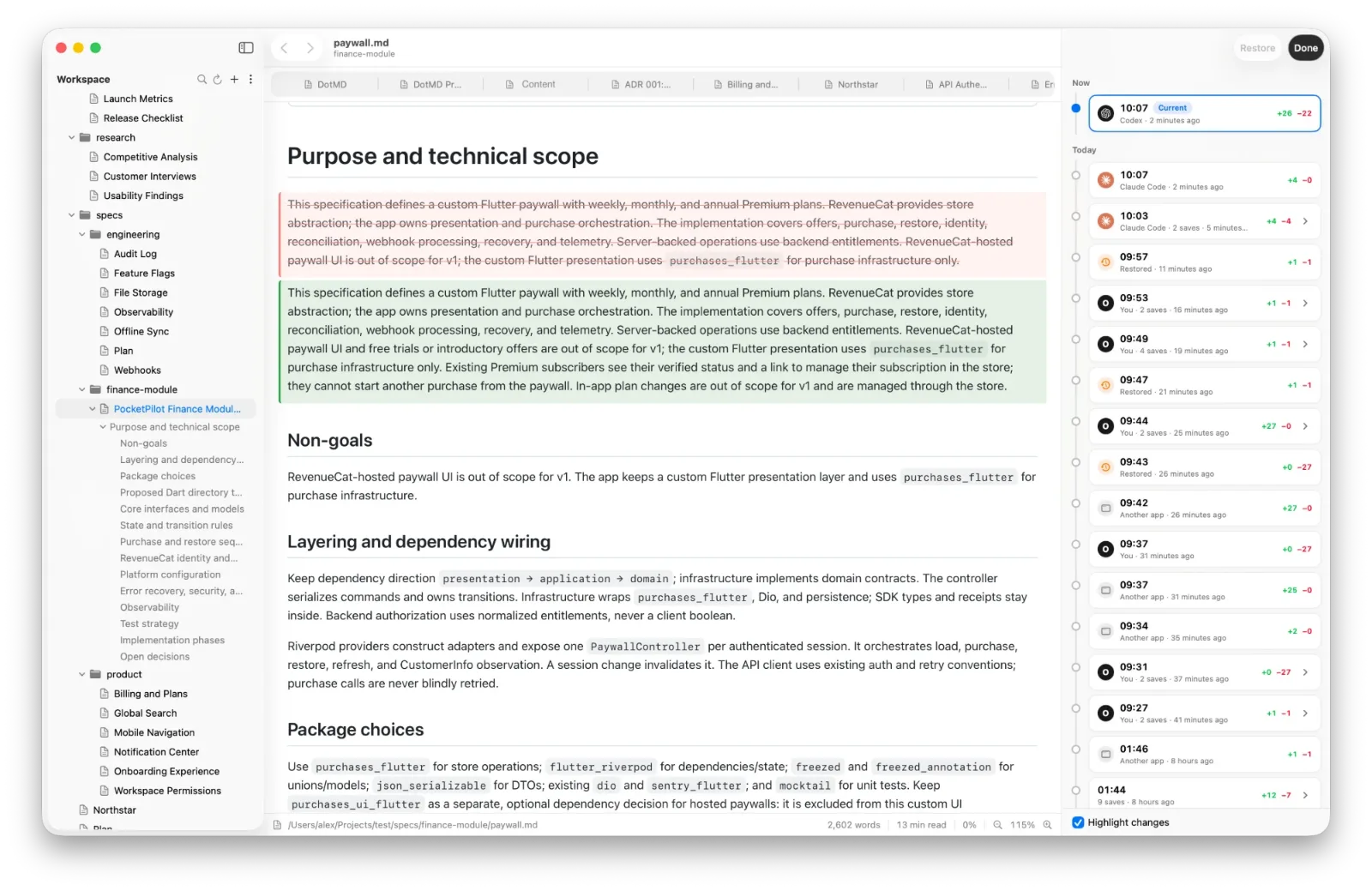
DotMD keeps earlier versions of every file you open. Open the history and each version is shown rendered, with what changed since the one before it: added text green, removed text red.
- Revert a single changed block, such as a paragraph or a table row, and keep the rest.
- Restore a whole earlier version. The current text is saved as a version first, so a restore can be undone.
- Files that another app changed, an agent or git for example, get an orange dot in the sidebar. Open one and DotMD goes straight to what changed since you last read it.
A file an agent creates keeps a single version until you first open it, so changes count from the text you first read.
When the file you have open changes on disk, a banner shows how many lines were added and removed, and Show Changes opens the history comparing it with the text before.
Let a second agent check the facts
A page can read well and still be wrong. Ask another agent to check it, and the remarks land in DotMD as comments with its name, for you to keep or delete before the writer sees them:
"Review docs/install.md in DotMD and leave comments on every command that doesn't work."
This is the loop described in One agent reviews another. You moderate the comments, so the writer only gets the remarks you agree with.
Check what readers will see
DotMD draws Mermaid diagrams, KaTeX formulas, tables, callouts and code with highlighting, so you read the page as your readers will. To hand it on, export to PDF or HTML, copy it as rich text into Mail, Notes, Pages or Google Docs, copy its HTML source for a blog or a CMS, or print it.
Questions from technical writers
Does DotMD support front matter?
Yes. Properties are shown as a card, and a file's title: can name it in the sidebar.
Can I search the whole docs folder?
Yes, with DotMD Pro: ⇧⌘F finds file names and every line with the text, across all folders in the workspace.
Can I export a page?
Yes, with DotMD Pro: PDF, HTML, Copy as Rich Text, Copy HTML Source, or print.
What happens to comments when a file moves?
They come back the first time you open the file at its new place.