 DotMD
DotMD
Your coding agent writes the plan.Review it before it writes the code.
Claude Code, Codex and Cursor usually write a plan before they build. DotMD gives that plan a code review in a native Mac app, with the agent you already use.
macOS 14 or later. Reading is free; DotMD Pro has a 3-day free trial.
Quick answer
Before an agent builds a feature, it usually writes a plan or a spec. DotMD gives that document a code review: comments on lines, fixes shown as a diff in the file, every version kept. It works with the agent you already use, over MCP. Reviews and the agent tools are part of DotMD Pro (3-day free trial); reading stays free.
Review the plan before the code
A wrong assumption in a plan costs one comment. The same assumption in the code costs a diff to read, a revert and another run. So read the plan first, while changing it is cheap.
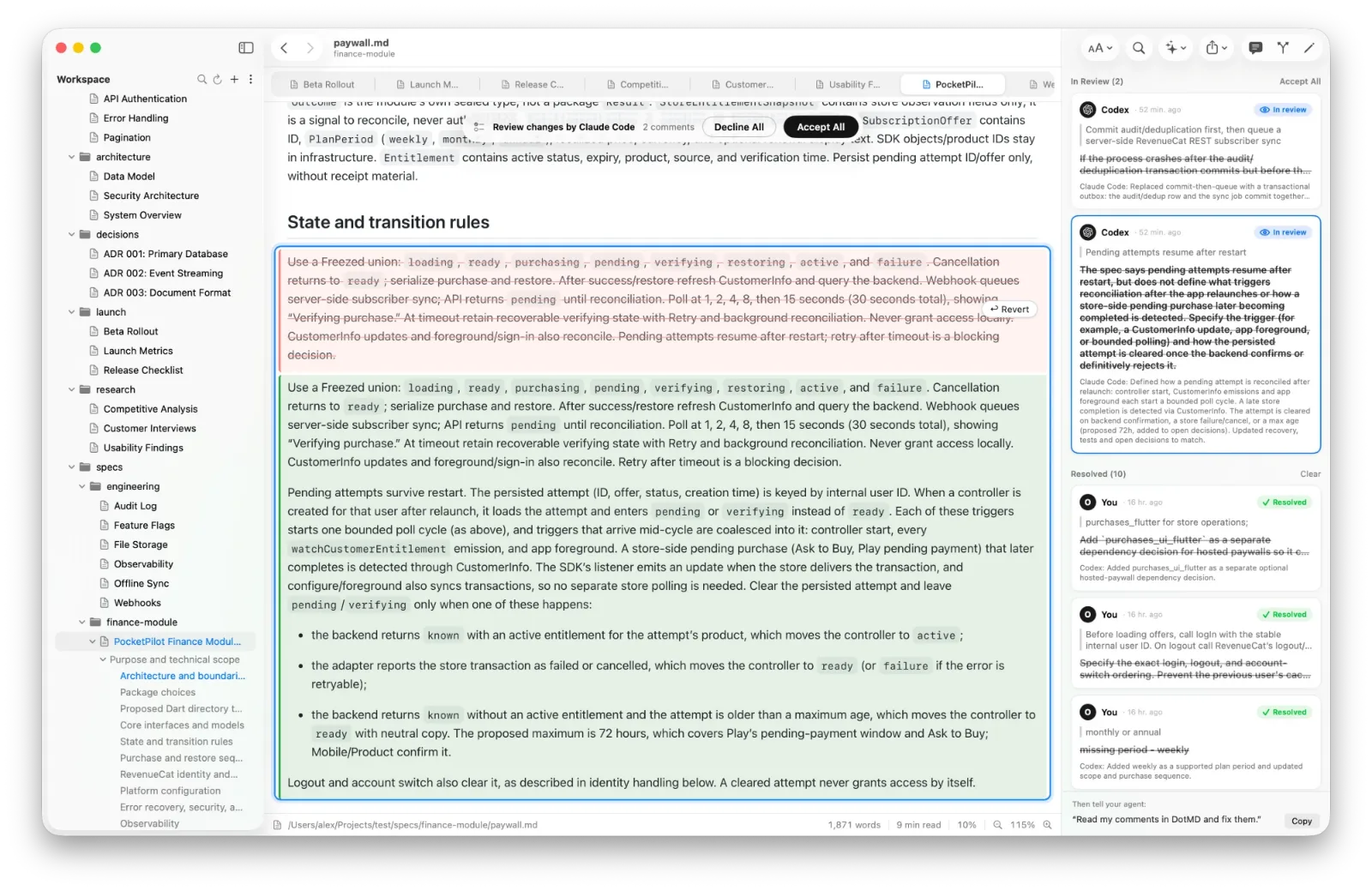
In a terminal the plan is a long block of text you scroll through. In DotMD it is a rendered document, and every remark you make is attached to the passage it is about:
-
Ask for the plan as a file
"Write the plan to docs/plan.md and send it to me in DotMD for review."
-
Comment where it is wrong
Select a passage, press ⌥⌘M and write the change you want. Do it for the whole plan, then click Send.
-
Check the fixes as a diff
The agent edits the file; old text is red and new text green, next to the comment each fix answers. Accept, reopen, or Accept All.
-
Approve, then let it build
Click Approve and the agent carries on with the code.
The agent sees each comment with its passage, its lines and who wrote it, so it knows exactly what you mean. It can also read the passage you have selected: "Rewrite the paragraph I selected in DotMD."
Ask it to "show me the changes in DotMD" when it is done, and it opens the review for you.
The documents agents write
Plans are the start. Agents also write, and you can review the same way:
- Specs and design docs.
- Architecture decision records (ADRs).
- READMEs and CHANGELOG entries.
- Migration, rollout and test plans.
- Comparison tables for libraries and services.
A second agent can review the first one's work too: Claude Code writes, Codex leaves comments, you decide. See One agent reviews another.
Works with your setup
DotMD runs a small MCP server on your Mac, and your agent connects to it with one line. Claude Code, Codex, Cursor and Visual Studio Code all work; each guide has the exact setup.
- Files, not a copy. DotMD reads and writes the Markdown files in your project folder. There is nothing to import or sync.
- git. When git, an editor or an agent changes a file, DotMD notices and keeps the earlier text as a version. Comments follow a file renamed with
git mvthe first time you open it at its new place. - Docker. An agent in a container reaches DotMD at
http://host.docker.internal:8089/mcp.
Make it a habit: a few lines in AGENTS.md
An agent sends a document for review when you ask it to. To have it do that every time, and to look for your comments in DotMD, add these lines to AGENTS.md for Codex or to CLAUDE.md for Claude Code:
Comments and reviews on Markdown files are kept in DotMD (MCP server `dotmd`), not in the files.
When I mention comments, a review or remarks on a .md file, read them with get_review_comments,
fix each one and send it back with resolve_review_comments.
After writing or substantially changing a spec, plan or design doc for me, send it to me with
request_review and wait for my answer; call it again after fixing my comments, until I approve.
The first line matters most. Your comments are kept by DotMD, not in the file, so an agent that doesn't think of DotMD searches the project for them and finds nothing.
Your files stay yours
- There are no accounts. Your files, comments and version history stay on your Mac.
- The MCP server answers on 127.0.0.1 only, so other computers can't reach it, and web pages can't use it.
- Comments and history are kept by DotMD, not in your files. The Markdown in your repo has no markers and no HTML comments.
Questions from developers
Does DotMD change how my repo looks?
No. It writes straight into your files; comments and history are kept by DotMD, not in the repo.
Does it work with git?
Yes. Changes from git are noticed and kept as versions like any other.
My agent runs in Docker.
Use http://host.docker.internal:8089/mcp as the address.
Is there a Linux or Windows version?
No, DotMD is a Mac app (macOS 14 or later).