 DotMD
DotMD
The agent drafts the PRD.You make it right.
Let Claude Code, Codex or Cursor write the first draft. Then review it like a document, not a chat: comment on passages, get the fixes in the file and accept each change.
macOS 14 or later. Reading is free; DotMD Pro has a 3-day free trial.
Quick answer
Ask Claude Code, Codex or Cursor to draft the PRD or spec as a Markdown file. Read it rendered in DotMD, comment on what should change, and the agent fixes each comment. You see every fix in place and accept or reopen it. Version history keeps every draft.
From draft to approved
An AI draft is quick to get and slow to get right. This is the loop that gets it right without copying text between a chat and a document:
-
Ask for the draft as a file
"Draft the PRD for password reset in docs/prd.md and send it to me in DotMD for review." The agent saves the file and waits for you.
-
Read it as a page
DotMD shows headings, tables and diagrams as they will look. You don't need to know Markdown.
-
Comment on what should change
Select a passage and write what you want instead. Comment on the whole draft, then send.
-
Check the fixes and approve
Each fix appears next to its comment. Accept it or reopen it, and approve when the draft is right.
Repeat as often as you need. Reopened and new comments go back to the agent together, and when nothing is left to change, you approve.
This works for PRDs, one-pagers, user-story lists, release notes, launch checklists and competitor tables: anything an agent drafts as Markdown and you have to get right.
Comment like you would on a shared doc
Select a sentence, a paragraph, a table row or a list item, press ⌥⌘M and write the note. The passage turns yellow and the comment stays with it, even when lines are added above.
Write the note the way you would brief a colleague: what is wrong and what you want instead. "Too vague, name the three metrics and their thresholds" gets a better fix than "fix this".
When you have gone through the draft, click Send at the bottom of the Review panel. The agent gets every comment at once.
See what changed, every time
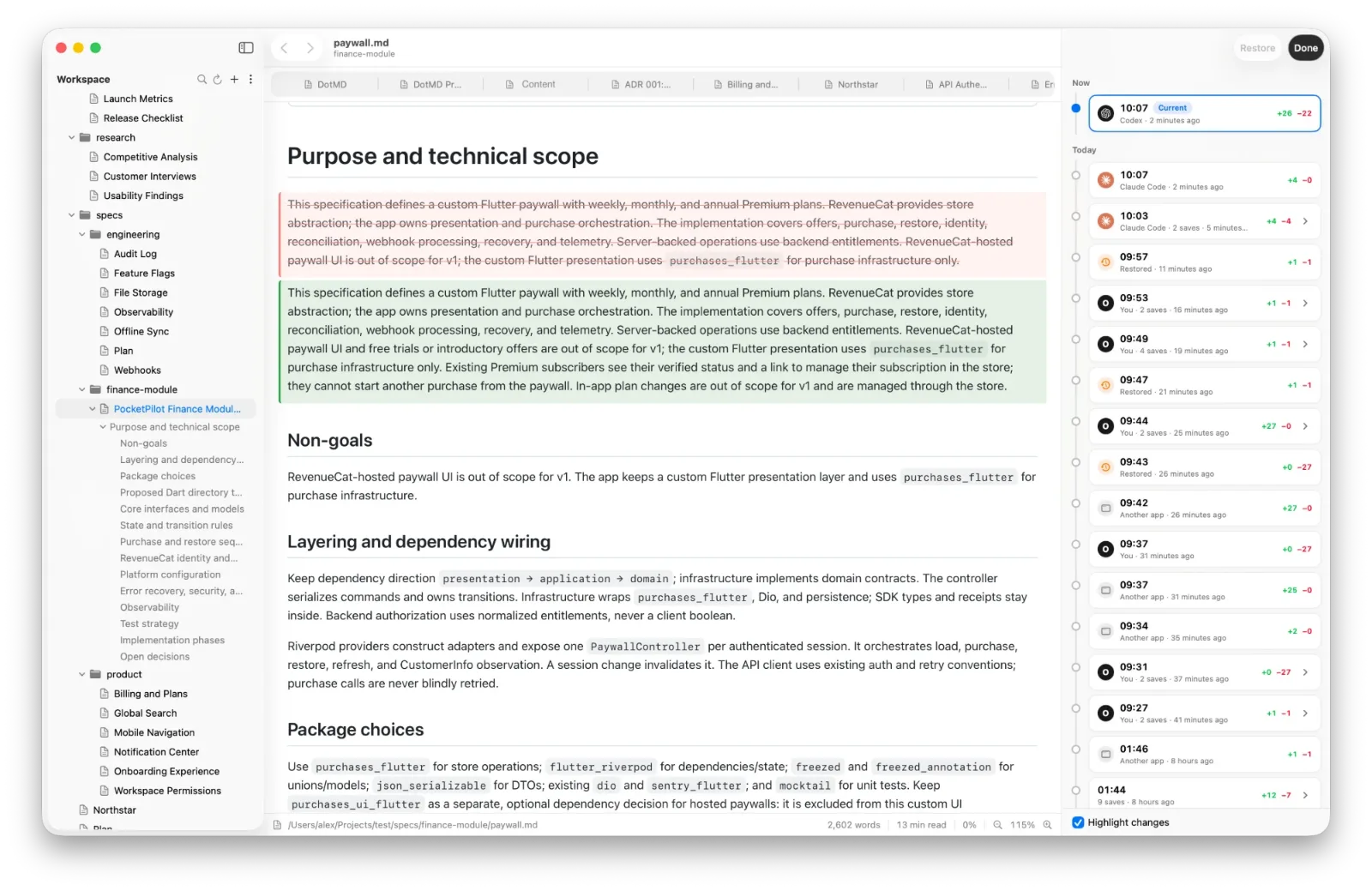
The agent's fixes show in the file, old text red and new text green, so you never have to compare two versions by eye. It may also update related places to match a fix, such as a summary table or the numbers in another section. DotMD shows those too, and counts any change no comment asked for.
Every state of the file is kept in Version History, with who made it: you, the agent or another app. Open an earlier draft, compare it, or restore it.
Things to ask your agent
A few requests that work well once DotMD is connected:
- "Draft the PRD for the new onboarding in docs/prd.md and send it to me in DotMD for review."
- "I left comments on the PRD in DotMD. Go through them."
- "Show me in DotMD where you changed the success metrics."
- "Rewrite the paragraph I selected in DotMD."
The agent can see the passage you selected, so you can point at a paragraph instead of quoting it. It cannot see your screen, though: a comment that says what to change works better than "this is wrong".
Read it the way it will be read
A PRD is read by other people, so check how it looks. DotMD draws tables, Mermaid diagrams, formulas and callouts. When it is ready, export it to PDF or HTML, or use Copy as Rich Text to paste it into Mail, Notes, Pages or Google Docs. Export is part of DotMD Pro.
Questions from product managers
Do I need to know Markdown?
No. You read the rendered page and comment on it; the agent edits the Markdown.
Can I share the result with people who don't use DotMD?
Yes, with DotMD Pro: export to PDF or HTML, or Copy as Rich Text into Mail, Notes or a doc.
Does my document go to DotMD's servers?
No. DotMD has no accounts and no server in between; files stay on your Mac.
Is reviewing free?
It's part of DotMD Pro: Yearly with a 3-day free trial, or Lifetime. Reading is free.