 DotMD
Not a wall of + and −.The changes, on the rendered page.
A line diff is made for code. For a document you want to read what changed, as text. DotMD shows the changes between versions on the rendered page.
macOS 14 or later. Reading is free; editing and reviews are one payment.
Quick answer
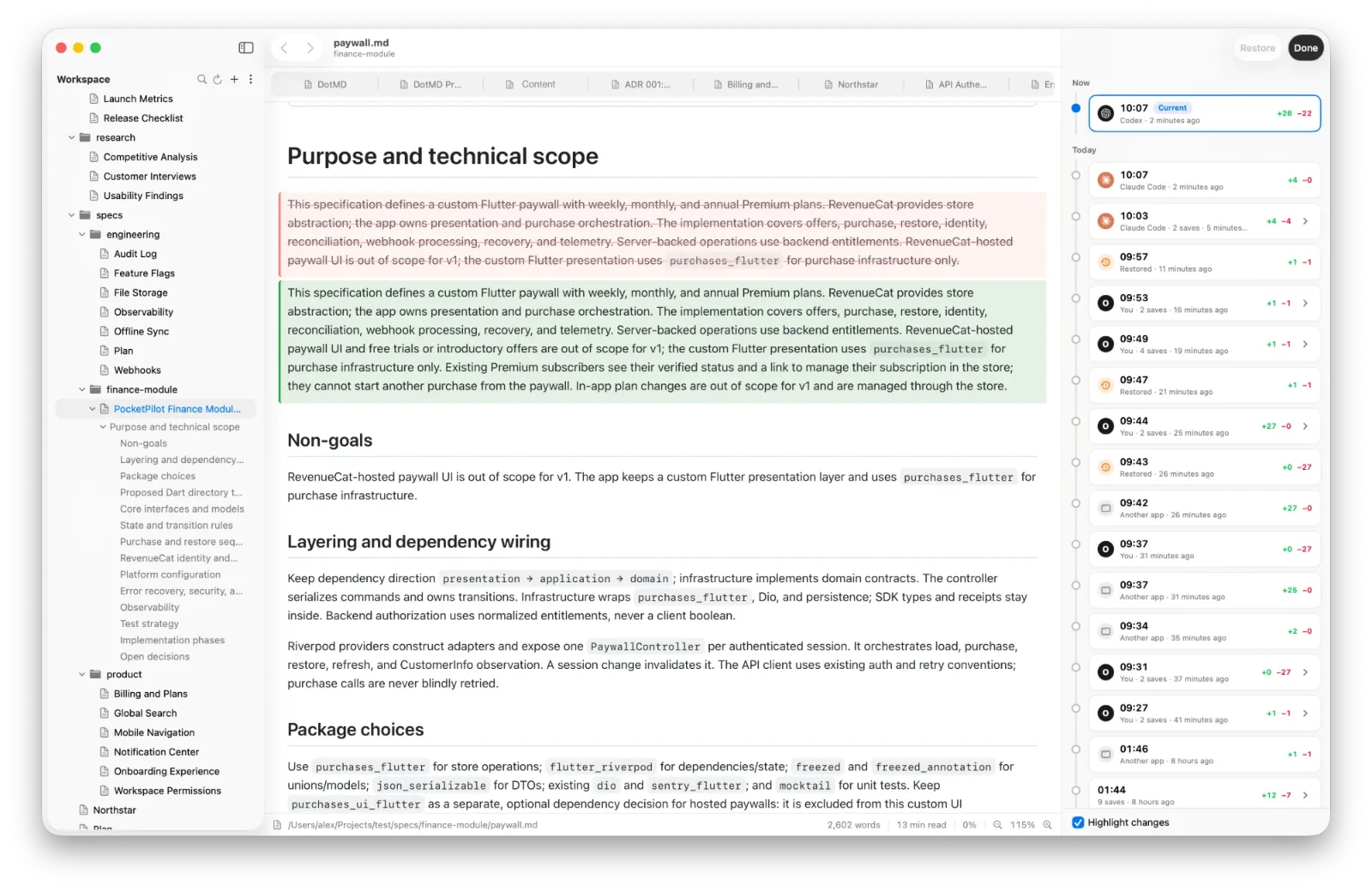
DotMD keeps earlier versions of every Markdown file you open and shows what changed between them on the rendered page: added paragraphs, list items and table rows in green, removed ones in red and struck through. Open File → Show Version History (⌥⌘Y), pick a version, restore it or undo single changes.
Why a line diff is hard to read for prose
A line diff compares text line by line. In code that works, because a line is a unit of meaning. In a document it does not: a paragraph is often one long line, so changing a single word makes the whole paragraph show as removed in red and added in green. Re-wrapping a paragraph does the same. You end up hunting for the one word that changed.
A table is worse. A changed cell is a changed row of pipes and dashes. What you want is the rendered table with the changed row marked.
DotMD shows the difference on the page you are reading: headings, paragraphs, list items, code blocks and table rows, added ones in green, removed ones in red, struck through.
Open the version history
Press the ⑂ button in the toolbar, ⌥⌘Y, or choose File → Show Version History. The window switches into history mode, like in Google Docs. The versions are listed by day on the right, with Current version at the top. The selected version is shown rendered in place of the page, with what changed since the version before it highlighted.
- Highlight changes turns the colours off, to see the version as it was.
- Restore puts the selected version back. The current text is saved as a version first, so a restore can be undone.
- Done (⌘↩) leaves history mode.
Versions are saved as snapshots: when you add a folder, when DotMD starts, whenever another app such as an AI agent, git or another editor changes the file, and when you open, leave or finish editing it. Older ones are thinned out like Time Machine, with at most 200 per file. History is a convenience, not a backup.
Undo one change, keep the rest
Restoring a version puts back the whole file. Often you want less: keep the new text except one paragraph. With DotMD Reviewer, on the current version each changed block is shown as its old text in red right above its new text in green.
-
Mark what to undo
Hover a change and click ↩ Revert on its red text. A paragraph that was only added gets ✕ Remove instead. The page shows how it will look.
-
Apply
Click Apply Reverts. The file is written with just those changes undone, and the rest stays. Cancel drops the marks. The text before is saved as a version, so even this can be undone.
After an AI agent edits the file
Files that another app changed since you last opened them get an orange dot in the sidebar. Open one and DotMD goes straight to its changes, with everything since you last saw it highlighted. If the open file changes, a banner says how many lines were added and removed, and Show Changes opens the comparison.
When you review an agent's fixes to your comments, the changes are shown next to each comment, and edits no comment asked for are counted as other changes. That is where an agent's surprises hide. See Reviewing changes.
Git diff or DotMD?
Use git to review code in a pull request: that is what a line diff is for. Use DotMD to read what changed in a document: a spec, a plan, a README, a comparison table. They do not compete. DotMD does not need a repository, and it also catches the changes that were never committed.
Questions about Markdown diffs
Does it need git?
No. DotMD takes its own snapshots; git is not required.
Which versions can I compare?
Each version is shown against the one before it. The current version shows everything since the last one.
Is it free?
The version list and Restore need DotMD Editor. Highlighted changes and single reverts need DotMD Reviewer. See pricing.
Can I see what an AI agent changed?
Yes. After an agent edits a file, the changes are shown per comment, and edits nobody asked for are listed separately.